Most products I look at send every AI request to the same model. Usually it is the biggest one the team tried first, because it gave the best results in the demo.
That works until the bill arrives. A request to tag a support ticket costs the same as a request to draft a contract, because both go to the same place.
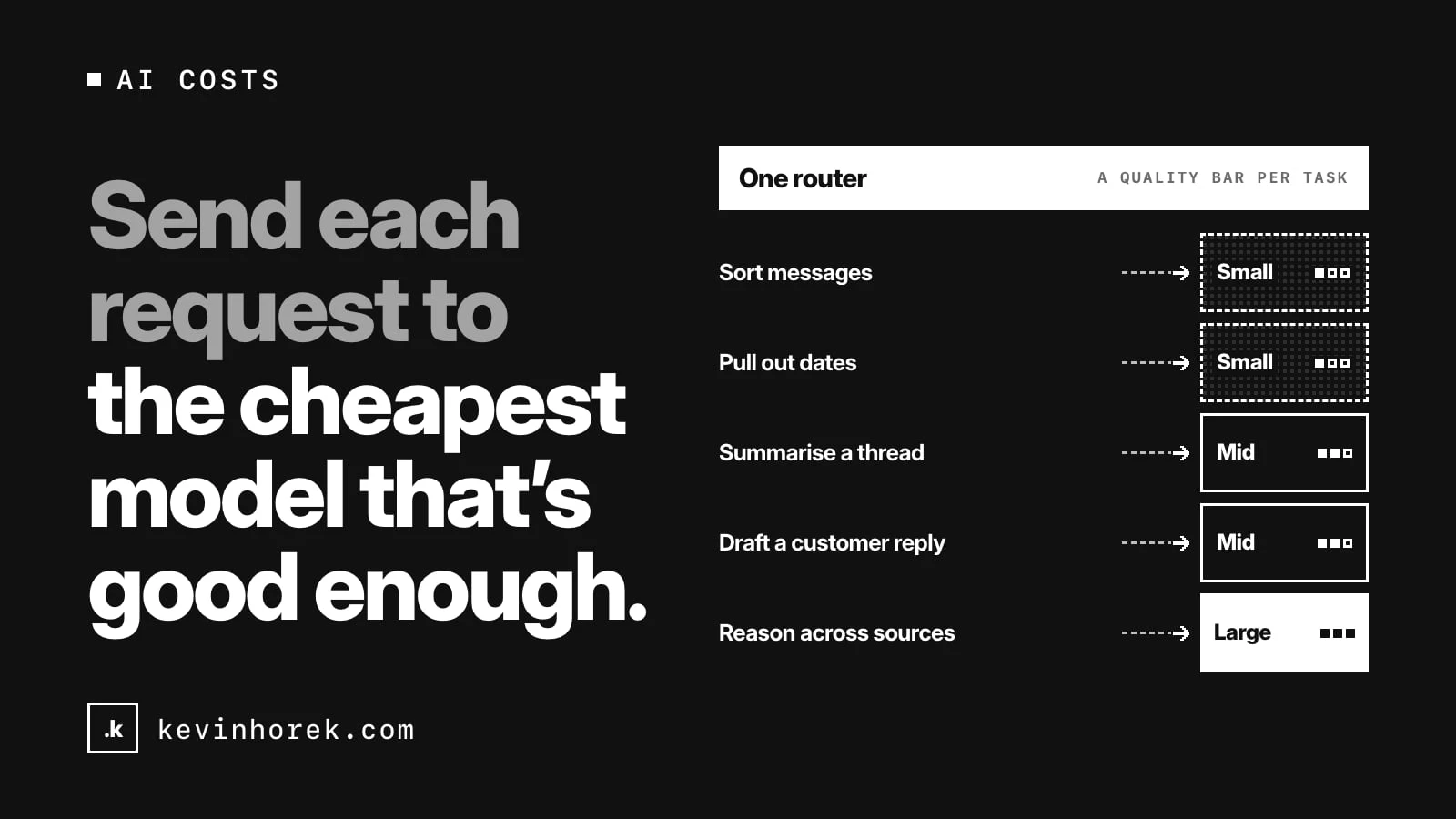
My advice: treat model choice as a decision you make per request, not once per product. Send each request to the cheapest model that meets the bar for that task. Set the bar on purpose. And give each team a spend cap it can see.
Not every task needs the best model
Look at what your product actually asks AI to do. It is rarely one thing.
A typical product might:
- sort incoming messages into categories;
- pull names, dates and amounts out of documents;
- summarise a long thread;
- draft a reply a customer will read;
- answer a complex question that needs reasoning across several sources.
The first two are narrow, well-defined jobs. Smaller, cheaper and faster models often handle them well. The last two are where a larger model can earn its cost.
If all five go to the same model, you are either overpaying for the easy work or underserving the hard work. Usually the first.
Define "good enough" for each task
"Cheapest" only makes sense next to a quality bar. Without one, you are just picking the lowest price and hoping.
For each task type, I would write down:
- What a good result looks like, with a handful of real examples.
- A test set: inputs with known good outputs, so you can score a model against them.
- The minimum score a model needs to be allowed on that task.
- The slowest response users will tolerate for it.
- Any data rules, such as personal details that must be removed first or must stay in a certain region.
Then score the candidate models on each task. The model that clears the bar at the lowest cost wins that task. When a new model comes out, run the same test set before you switch. I wrote more about that in should you switch AI models?
The test set is the part teams skip, and it is the part that makes the rest safe. Without it, routing to a cheaper model is a guess.
Put the routing in one place
Don't scatter model choices through the codebase. If each feature calls a provider directly, changing anything means a code change in many places.
I would put a single layer between your product and the model providers. Every request goes through it with a label: the task type, the quality tier, the latency limit, the cost ceiling. The layer picks the model, applies data rules, logs the request and returns the result.
That gives you:
- one place to change which model handles which task;
- one place to remove personal details before a request leaves;
- one log of every request, its cost and its result;
- a fallback when a provider is slow or down.
It also fits a rule I already follow: keep AI calls on the server, not in the browser, where keys and costs are exposed.
Cache what repeats
Many AI requests are close to identical. The same document gets summarised twice. The same question gets asked by different users.
Caching answers to repeated requests can cut cost and speed things up, as long as you are careful about what can be shared. A cached answer for one customer should never be served to another. Decide what is safe to cache per task, not globally.
Give each team a spend cap
Once requests go through one layer, you can see spend by team, feature and task. Use that.
I would give each team or feature a monthly budget, visible on a dashboard they actually look at. When a team gets close, it should know before finance does. When a feature's cost per use creeps up, someone should ask why.
Caps change behaviour. A team that can see its spend starts asking whether a task really needs the biggest model. That question is worth more than any single routing rule. There is more on this in what an AI feature costs to operate.
Watch quality after you route
Routing to cheaper models is not a one-time saving. Models change, inputs drift, and a model that was good enough in testing can slip.
Keep a small sample of real requests scored against your quality bar each week. Track complaints, retries and cases where a person had to fix the output. If a task's quality drops, move it up a tier until you understand why.
The short version
- List the tasks your product asks AI to do.
- Write a quality bar and a test set for each.
- Route each task to the cheapest model that clears its bar.
- Put routing, data rules and logging in one layer on the server.
- Cache carefully, per task.
- Give each team a visible spend cap.
- Keep scoring quality, and move tasks up a tier when it slips.
I built a rough prototype of this idea, TokenBridge. Its router lab lets you set the task, quality tier, latency limit and cost ceiling, then shows which model it would pick and why. Try the demo. It runs on demo data and sends nothing to any provider.
How do you choose models today: one for everything, or a different one per task? If you have found a routing rule that works, email me.
#AI #Costs #SoftwareArchitecture