A prototype has one environment: wherever it happens to be running. You change something, refresh, and it's live. For one person testing an idea, that's exactly right.
Once people depend on the product, the same habit becomes the risk. A change that breaks sign-in breaks it for everyone at once, with their real data underneath.
None of what follows is new. It's the release setup I've come to rely on over 30+ years and 50+ shipped platforms. AI coding tools make it more important, not less, because changes now arrive faster than anyone can check them by eye. Here's each piece and why it's there.
Three environments, three databases
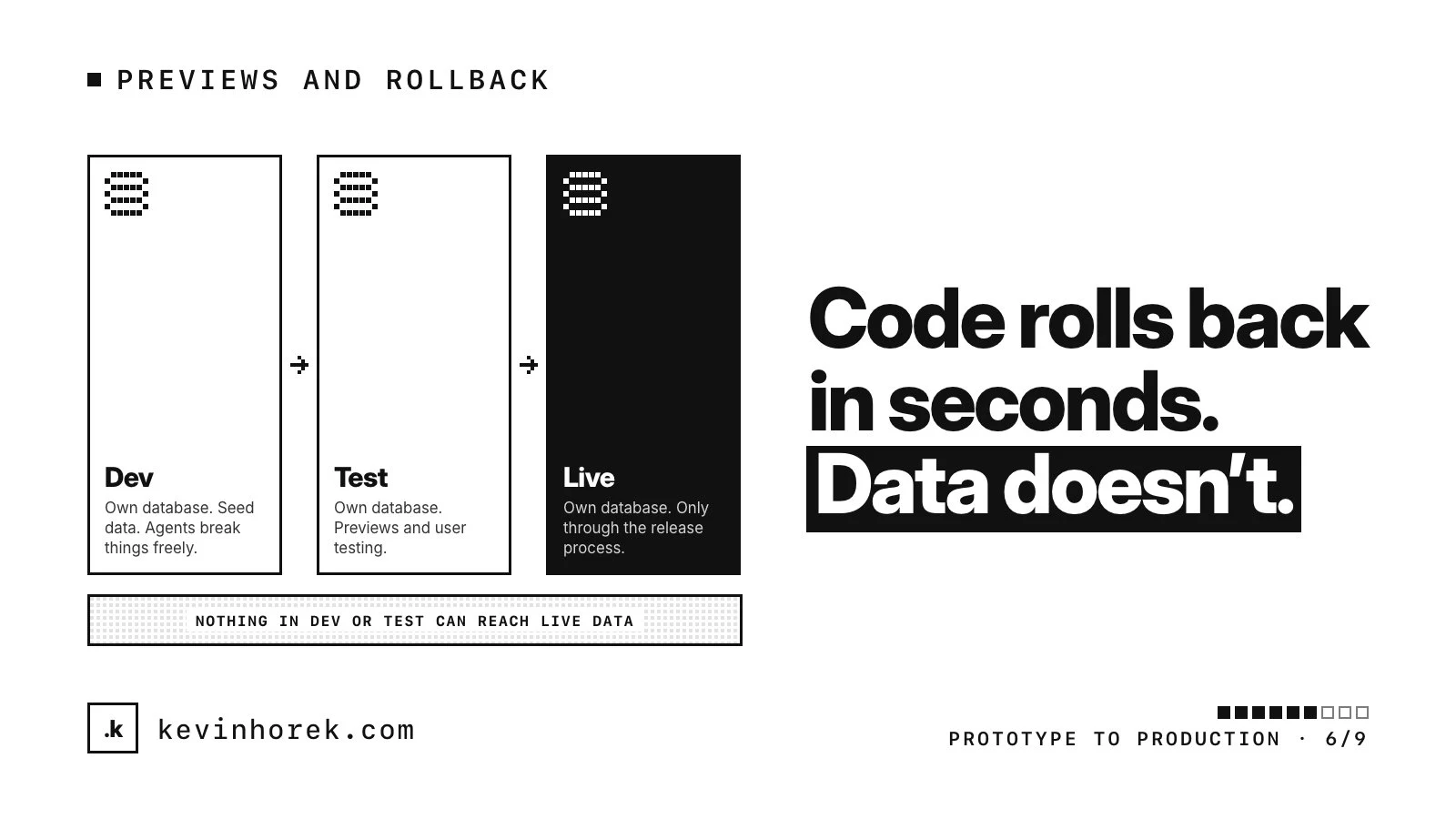
I want dev, test and live, each with its own database, keys and auth settings.
- Dev is where developers and coding agents break things freely, on seed data.
- Test matches live's configuration. Previews and user testing happen here, on seed or masked data.
- Live is reached only through the release process.
The rule that matters most: nothing in dev or test can reach the live database. On Vercel, for example, each environment can have its own variables, such as database connections and API keys. Check where each one points, because a preview wired to the live database isn't a preview. Vercel's guide also warns that a staged production build uses production variables, so testing it can reach real services and data.
If you're on Supabase, my launch checklist covers separate projects. Its branching feature can also give each pull request its own database, built from your migrations, with no production data by default.
A preview for every change, reviewed before it merges
Every change goes on a branch with a pull request, and every pull request gets a preview build: a working copy of the app at its own URL, connected to test.
On Vercel, by default, pushing to any branch other than production, or opening a pull request, creates a preview deployment with its own generated URL, and the link usually appears in the pull request. Other platforms have their own versions of this, so check yours.
Then review the preview, not just the code. Click through the change at every screen size you support, in each role it affects. For anything that touches a core flow, real users try it too.
Make the review a rule rather than a habit. GitHub's protected branches can require approving reviews and passing status checks before anything merges. And keep previews private. Vercel's Deployment Protection has a standard setting, available on all plans, that protects every deployment except your production domains.
Feature flags for unfinished work
Small changes merged often are easier to review and easier to undo than one big merge at the end. Feature flags let you work that way without showing half-built features.
A flag is a setting that turns a feature on or off by environment, account or user. I use them to:
- merge unfinished work with the feature switched off in live;
- turn a feature on for one pilot customer first;
- switch off a misbehaving feature, such as an AI step, without a deploy.
Two cautions. A flag hides a feature but doesn't secure it, so the server still checks permissions. And flags pile up. Give each one an owner and a removal date, because every combination is a version of the product nobody tested. At v1, a simple settings table is enough.
Database migrations, carefully
Code rolls back in seconds. Data doesn't. Vercel's Instant Rollback points your domains back to an earlier build. It doesn't change environment variables, and it reminds you that external APIs and databases may have changed since. Your database stays exactly as the new release left it.
So the previous build has to keep working with the new schema. I make schema changes in two steps:
- Expand. Add the new column or table without breaking anything that uses the old one. Ship code that uses the new shape, and fill in existing rows.
- Contract. In a later release, once nothing reads the old shape, remove it.
Never rename or drop something in the same release as the code that stops using it. Every migration is a file in the repository. It runs in dev, then in test on realistic data, then in live through the pipeline, not from someone's laptop. The model those migrations change is worth getting right early, which is the subject of designing the real data model.
A rollback point for every release
Before each release, know exactly what you would go back to, how, and who can do it.
- Code: the previous build. On Vercel that's Instant Rollback. Afterwards, new pushes stop going live automatically until you undo the rollback, which is worth knowing before you need it.
- Features: often the fastest rollback is turning a flag off.
- Data: backups or point-in-time recovery, with at least one practice restore behind you.
Decide in advance what triggers a rollback: sign-in failures, a jump in errors, a broken core task. Then nobody debates it while users are stuck. Practice it once on test.
A short release checklist someone signs off
My rule is that nothing reaches production until it passes automated tests, a security review and sign-off on the preview. A checklist makes that concrete. Keep it to one page, use it every time, and put a named person at the bottom. Humans keep launch authority, even when AI wrote most of the change.
- The preview was reviewed and approved, and real users tried any change to a core flow.
- Automated tests and required checks passed.
- Migrations ran in test and still work with the previous build.
- Flags for unfinished work are off in live.
- The rollback point is known, and someone who can use it is around.
- Someone is watching errors and the agreed metric after release.
- Signed off by a named person, with the date.
All of this is easier to set up before the first real user than after the first bad release.