Every product people use at a desk reaches this question. Ship a desktop app, or let the browser do the work?
Founders often arrive with the answer decided. Some assume a "real" app looks more serious. Others assume the browser is always enough. Neither is true by default.
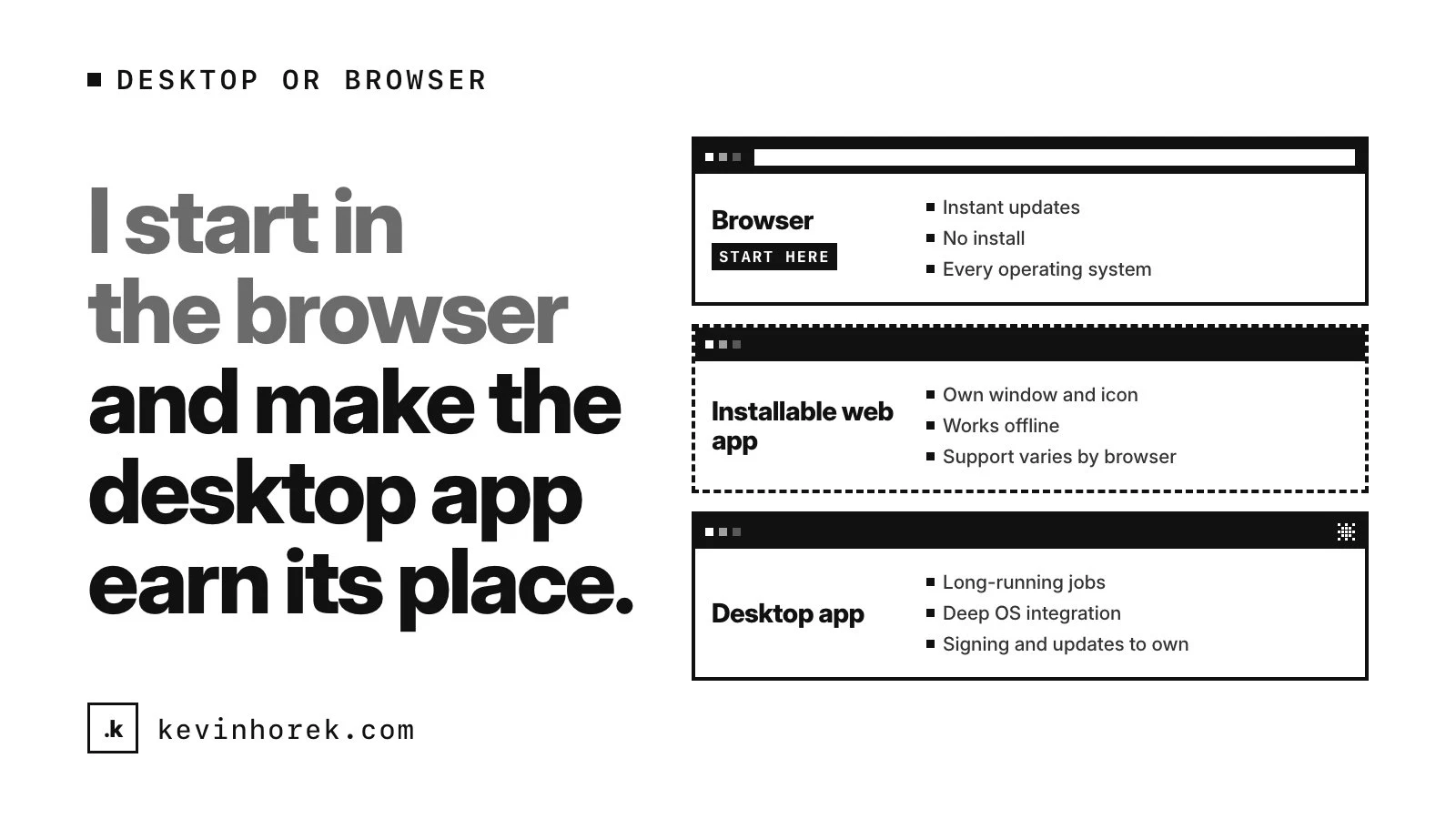
After 30+ years in technical UX, front-end and product, and more than 50 shipped platforms, I start in the browser and make the desktop app earn its place. I also build from one codebase wherever I can. Here is how I decide.
When the browser is enough
Most business software belongs in the browser: dashboards, admin tools, work queues, forms and reports. The browser gives you things a desktop app has to work for:
- Instant updates. Everyone is on the new version the moment you deploy.
- No install. A link is the onboarding, even on a locked-down work laptop.
- Every operating system. One codebase runs on Windows, macOS, Linux and ChromeOS.
If the work ends when the tab closes, the browser is probably the right home.
The middle ground: installable web apps
A progressive web app (PWA) can be installed with its own window and icon, and no installer. Browsers now allow much more than that, but support varies:
- Installing. Per MDN, Chromium browsers such as Chrome and Edge install PWAs on every desktop system they support. Safari on macOS Sonoma and later offers Add to Dock. Firefox on desktop does not install PWAs from a manifest.
- Offline. A service worker keeps the app working without a connection, in all major browsers.
- Notifications. Web push works across the major browsers. On iPhone and iPad it arrived in iOS 16.4 for web apps added to the Home Screen.
- Files. The File System Access API lets a web app open, edit and save the user's files and folders, with permission. MDN's compatibility data lists the file picker in Chrome and Edge, not in Firefox or Safari.
- Hardware. Chrome's capabilities project added WebUSB, WebHID, Web Serial and Web Bluetooth. Safari supports none of them.
A Chromium-only feature is fine for an internal tool where IT standardises on Chrome or Edge. It is a problem for a product sold to Safari users.
When a desktop app earns its place
- Deep file work and long-running jobs. Watching folders, syncing thousands of files, overnight processing. Browsers can freeze or discard hidden pages to save resources, and a frozen page's timers and fetch callbacks stop. A desktop process can keep running after its window closes.
- OS integration. A menu bar or tray icon, global shortcuts and native notifications. Electron's global shortcuts work even when the app does not have keyboard focus, and Tauri offers a system tray and a global shortcut plugin.
- Offline-first work. A PWA can work offline, but browser storage is best effort by default. Browsers can clear it under storage pressure, and Safari's tracking prevention can delete script-created data for a site with no user interaction in seven days of browser use. If people work offline for days on data that matters, a desktop app with its own local database is safer. More in local-first by default.
- Heavy local processing. Large media files, big datasets or models running on the device, where you want native libraries and the whole machine.
- Hardware the browser can't reach. Anything that needs a driver or a vendor SDK.
- Enterprise IT. Some IT teams want a signed installer they can deploy and update on their own schedule. Others are happy with a web app: Chrome lets admins force-install web apps on managed browsers, and users can't remove them. Ask IT before you build an installer.
What desktop costs
- Signing and notarization. Electron's code signing docs note that Windows and macOS both block unsigned apps unless users take several manual steps. On the Mac, Apple requires notarization for software distributed with Developer ID, so every release needs a signing step.
- Auto-updates. You own the pipeline. Electron offers an autoUpdater module, and Tauri's updater requires signed updates. Old versions linger, so your API has to support them.
- Testing on several systems. At least Windows and macOS, often Linux, on every release.
- Install friction. Download, run, approve a dialog. Each step can lose someone in a trial.
- Support. Versions in the wild, machine-specific bugs and permission prompts that differ by system.
None of this rules desktop out. It means budgeting the time and naming who owns it.
Electron or Tauri
Both wrap the web codebase you already have.
Electron embeds Chromium and Node.js in every app. The native layer is JavaScript or TypeScript on Node.js, and every system gets the same engine. Its own docs say most Electron apps are over 100MB on disk, and argue that bundling gives you control over the engine and its security updates.
Tauri uses the web view already on the system: WebView2 on Windows, WebKit on macOS and WebKitGTK on Linux. The native layer is Rust, and its docs say a minimal app can be under 600KB. The trade-off: web features depend on each system's web view version, so test each one. Tauri also targets iOS and Android.
On memory, measure your own app. Electron's docs concede a built-in web view sometimes uses fewer resources for simple pages.
Where I have needed a desktop version, I have used a Tauri shell around the same web app, so features ship everywhere at once. Electron suits a TypeScript team that wants one engine everywhere. Tauri suits a product where size matters and someone can own some Rust. The same thinking applies to phones, which I covered in Expo or native.
A decision checklist
- Does the work end when the tab closes? Start with the browser.
- Does anything need to run for hours, or after the window closes? Lean desktop.
- Do you need a tray icon, global shortcut or deep OS integration? Desktop.
- Will people work offline for days on data that matters? Desktop, or a carefully built local-first web app.
- Which browsers do your users use? Chromium-only features stretch a PWA further.
- Does it talk to hardware? Check WebUSB, WebHID and Web Serial against your device and browsers.
- What does IT need: a force-installed web app or a signed installer?
- Who owns signing, notarization, updates and testing on each system next year?
If most answers point to the browser, ship the web app, make it installable and revisit later. If you can't tell yet, a browser prototype can show whether the desktop-only features matter before you commit.
If you are weighing a desktop app for your product, email me with what it needs to do and who uses it. I am happy to work through the trade-offs with you.