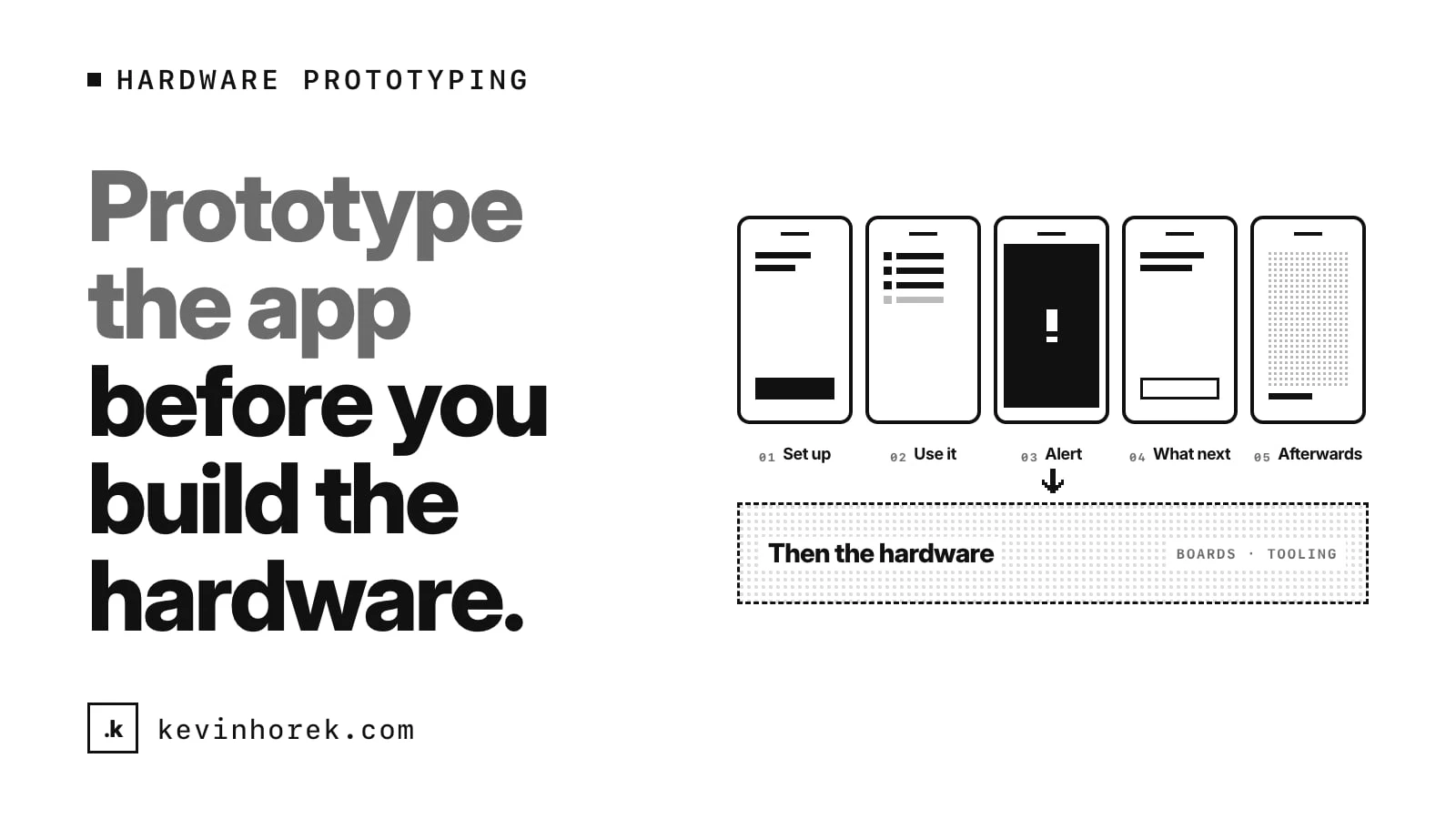
If you have an idea for a physical device, build the app that goes with it first. Make it clickable, fill it with made-up readings and walk people through it.
Hardware is slow and expensive to change. A circuit board revision takes weeks. Tooling for a case costs real money. Once you have committed to a sensor, you live with what it can and cannot do.
An app prototype costs a fraction of that and changes in an afternoon. And for most connected devices, the app is where people actually experience the product. The device takes a reading. The app decides what that reading means and what to do next.
The device is rarely where people get stuck
When founders describe a hardware idea, they talk about the sensor. How accurate it is, how small, how fast.
When people use a connected device, the hard moments are usually somewhere else:
- Pairing it for the first time.
- Understanding what a reading means.
- Knowing what to do when something goes wrong.
- Remembering to charge it, clean it or restock it.
All of those live in the app. You can test every one of them before a single part is ordered.
How I tried this with Bite Check
Bite Check is a concept I prototyped for people with celiac disease who eat out. The idea is a utensil case that checks each bite for gluten, paired with a phone app.
The case does not exist. Every reading, restaurant and meal in the demo is made up, and it is not a medical device. What exists is the app, built well enough to walk someone through a whole meal.
That was the point. I wanted to find out what the experience should be before anyone worries about the sensor.
Try the demo. It runs on made-up data and is a concept, not a product.
Walk through the whole flow, not one screen
A single screen tells you very little. A walk-through from start to finish tells you where the idea holds up.
For Bite Check, that meant:
- Set-up. A pairing walk-through for the case, then choosing a limit and how alerts should feel: buzz and chime, buzz only or a banner only.
- The meal. A bite-by-bite log with a reading and a confidence level for each one, and a simple scale from likely safe to gluten present.
- The alert. On the fourth bite, a reading comes back amber.
- What happens next. Help talking to the server, a safer dish to order and a fresh check of the replacement.
- Afterwards. Meal history, and reminders to clean the case and restock swabs.
Walking through all five showed me that the reading is the easy part to design. The alert and what follows it are the hard part.
Design the bad moment first
The moment that defines a device like this is when it says something is wrong. For Bite Check, that is a positive reading in the middle of a meal, at a restaurant, in front of other people.
So I spent most of my time there. What does the person need in that moment?
- How sure is this reading? The alert shows a confidence ring and the measured range against the limit they chose.
- Can I check again? There is a re-check with a fresh swab, which takes a second reading and raises the confidence.
- What do I say? A short script for the server, a large-type card to show them, and a question to ask the kitchen.
- What do I eat instead? A safer dish from the menu, which is then checked bite by bite until it comes back clear.
One decision changed during the build. An early version had an "I'm okay to continue" button on the alert. Walking through it, that felt wrong. Inviting someone with celiac disease to keep eating a flagged dish is the wrong default. It became "Re-check with a fresh swab".
That is the kind of decision you want to make in software, where it costs nothing to change, not after a device is in people's hands.
What an app prototype tells you about the hardware
Prototyping the app first also writes part of the hardware brief for you.
Walking through Bite Check raised questions the device would have to answer:
- How many swabs does the case hold, and how does the app know when it is running low?
- How long does a reading take? If it is slow, the bite-by-bite flow does not work.
- Does the case need to be cleaned, and how will people know when?
- What happens when the battery is low in the middle of a meal?
- Can people find the case if they leave it at the table?
Each of those became a screen in the prototype: case status, a cleaning reminder, a find-my-case chirp, calibration. Each one is also a requirement the hardware has to meet. You find them by walking the flow, not by drawing the device.
How to run the walk-throughs
You do not need a lab. You need the right people and a script.
- Recruit people who match the user. For Bite Check, that means people who eat out with a condition that makes it risky. Not friends who are being polite.
- Set the scene. "You are at a restaurant. You have just ordered. Show me what you would do."
- Let them drive. Hand them the phone and watch. Where do they hesitate? What do they expect to happen?
- Trigger the bad moment. Make sure every session reaches the alert. That is where you learn the most.
- Ask about the device last. Once they have used the app, ask whether they would carry the device, and what would stop them.
I covered the general version of this, designing a small experiment before you build the full thing, in how I would test a product idea before building the full application.
Be honest about what it is
A clickable prototype with fake readings can look convincing. That is useful in a test session and risky anywhere else.
Label it clearly. Bite Check says in the side panel and in Settings that it is not a real product or a medical device. When you show it to investors or potential users, say plainly that the hardware is a concept and the readings are invented. For anything health-related, be especially careful not to suggest it works today.
The walk-through is evidence that the experience makes sense. It is not evidence that the sensor can be built.
When to move to hardware
I would move on to a physical prototype when:
- People who match the user get through the whole flow without help.
- The bad moment feels manageable to them, not alarming.
- They say they would carry the device, and you believe them.
- You have a list of hardware requirements that came from the walk-throughs.
At that point the money you spend on parts and boards is going toward something people have already shown they want to use.
If you are working on a connected device, how are you testing the experience before the hardware is ready? I would like to hear what has worked for you. Email me if you want to compare notes.
#Prototyping #Hardware #ProductDesign #UserTesting