Think about the last time you had a thought you wanted to keep. A task, a phone number, a line for an email, an idea for later.
Now think about what your tools asked you to do first. Pick a project. Choose a list. Add a title. Set a due date. Select a type. By the time you were allowed to type, the thought was half gone.
A lot of software asks people to file before they type. It is one of the most common mistakes I see in notes apps, task tools, support forms and internal intake screens.
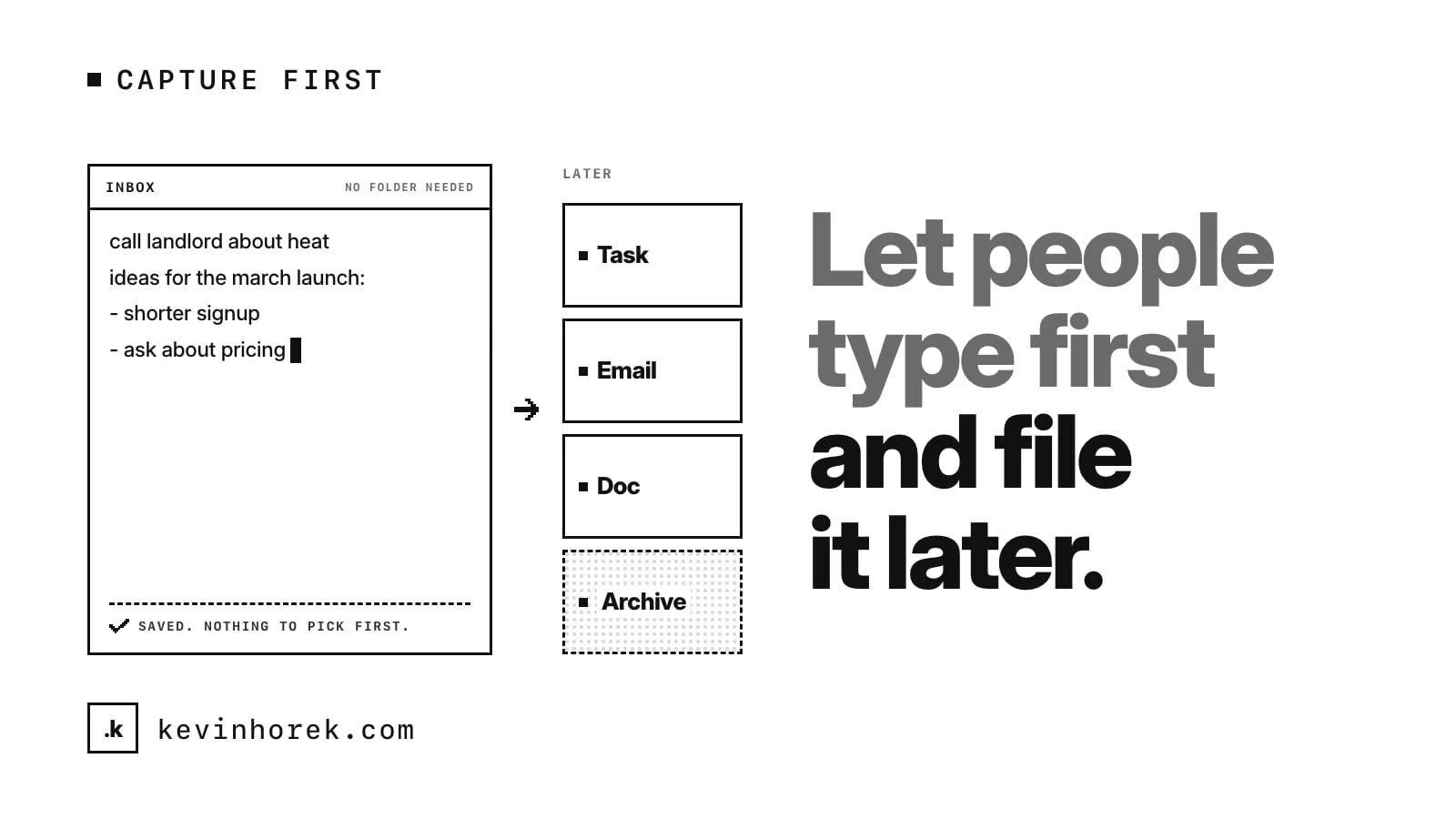
My advice is simple: start with plain text. Let people capture first, and decide where it goes later.
Capture and filing are different jobs
Capturing a thought takes seconds and needs almost no attention. Filing it takes judgment. Which project? Is this a task or a note? Who should see it?
When you force both at once, you get one of two results. People stop capturing, because it is too much work. Or they file badly, because they are in a hurry, and the thing ends up in the wrong place where nobody finds it.
Splitting the two jobs fixes both. Capture is fast because it asks for nothing. Filing is better because it happens when the person has a moment to think.
Open to a blank page
The first screen of a capture tool should be a place to type. Not a dashboard. Not a list of folders. A cursor in an empty box.
The same applies outside notes apps. An internal request form can start with one large text box: "What do you need?" The structured fields can come after, filled in by the person, a teammate or software that suggests values from the text.
A few details matter:
- Open fast. If it takes several seconds to reach the box, the thought is gone.
- Have a shortcut. A keyboard shortcut or one button that opens capture from anywhere.
- Keep the text if anything goes wrong. Losing a half-typed note is the fastest way to lose a user's trust.
Save everything to one inbox
Everything captured should land in one place by default: an inbox. Nothing is lost, nothing is in the wrong folder, and the person knows where to look later.
The inbox is not a failure to organise. It is a holding area with a clear job. Items wait there until someone decides what they are. The rule is that the inbox gets reviewed, daily or weekly, so it does not turn into a landfill.
If you want light structure at capture, make it optional. Tags are a good middle ground. A person can add one in a second if they know it, or skip it if they don't.
Decide where it goes after
Once the text exists, moving it should take one action, not five.
That is where most tools fall down. The note is in one app and needs to become an email, a message, a task or part of a document. So the person copies, switches app, pastes, and fixes the formatting. Every time.
A better pattern is a short list of actions that work on the text itself:
- send it as an email or a message;
- turn each checklist line into a task;
- add it to a document or a running log;
- export it as a file;
- archive it when it is done.
Each action should show exactly what will happen before it runs: who the email goes to, which tasks will be created, what the file will contain. That preview is what makes people comfortable doing it in one step. It is the same reason I care about showing what is about to happen in where an AI agent should ask for human approval.
Plain text keeps working
There is a second reason to start with plain text. It lasts.
Plain text with light formatting opens in almost any tool, on any device, years later. It can be searched, copied, versioned and moved without a converter. If a product needs richer structure later, it can be added on top. Going the other way, from a locked format back to text, is much harder.
This is part of why I like tools that keep data local and simple by default, which I wrote about in local-first by default.
Where AI fits
AI can help with the filing step. It can suggest a tag, spot that a note is really three tasks, or draft the email from the rough text. That is useful.
It should not slow down capture. Run suggestions after the text is saved, and let the person accept or ignore them. If a suggestion is wrong, it costs a click. If capture waits on a model to decide where something goes, you are back to filing before typing.
Let people type first. Everything else can wait until the thought is safe.
Try it
I built a rough prototype of this idea, Dispatch, a quick-capture text app. Every draft starts as plain text, quick capture saves straight to an inbox with optional tags, and a panel of actions sends the draft where it needs to go, previewing each step first. Try the demo. It runs in your browser, and anything that would reach another service ends with "Demo only: nothing was sent."
A checklist for capture-first tools
- Open to a place to type, fast, from anywhere.
- Never require a project, list or type before typing.
- Save everything to one inbox by default, and keep text safe if anything fails.
- Make tags and other structure optional at capture.
- Move text on with one action, and preview what each action will do.
- Keep the content in plain text with light formatting.
- Let AI suggest where things go after capture, never before.
How do you capture quick notes today, and how many steps does it take to get one where it belongs?
If your tools make you file before you type, email me and tell me where it hurts most.
#UX #Productivity #ProductDesign