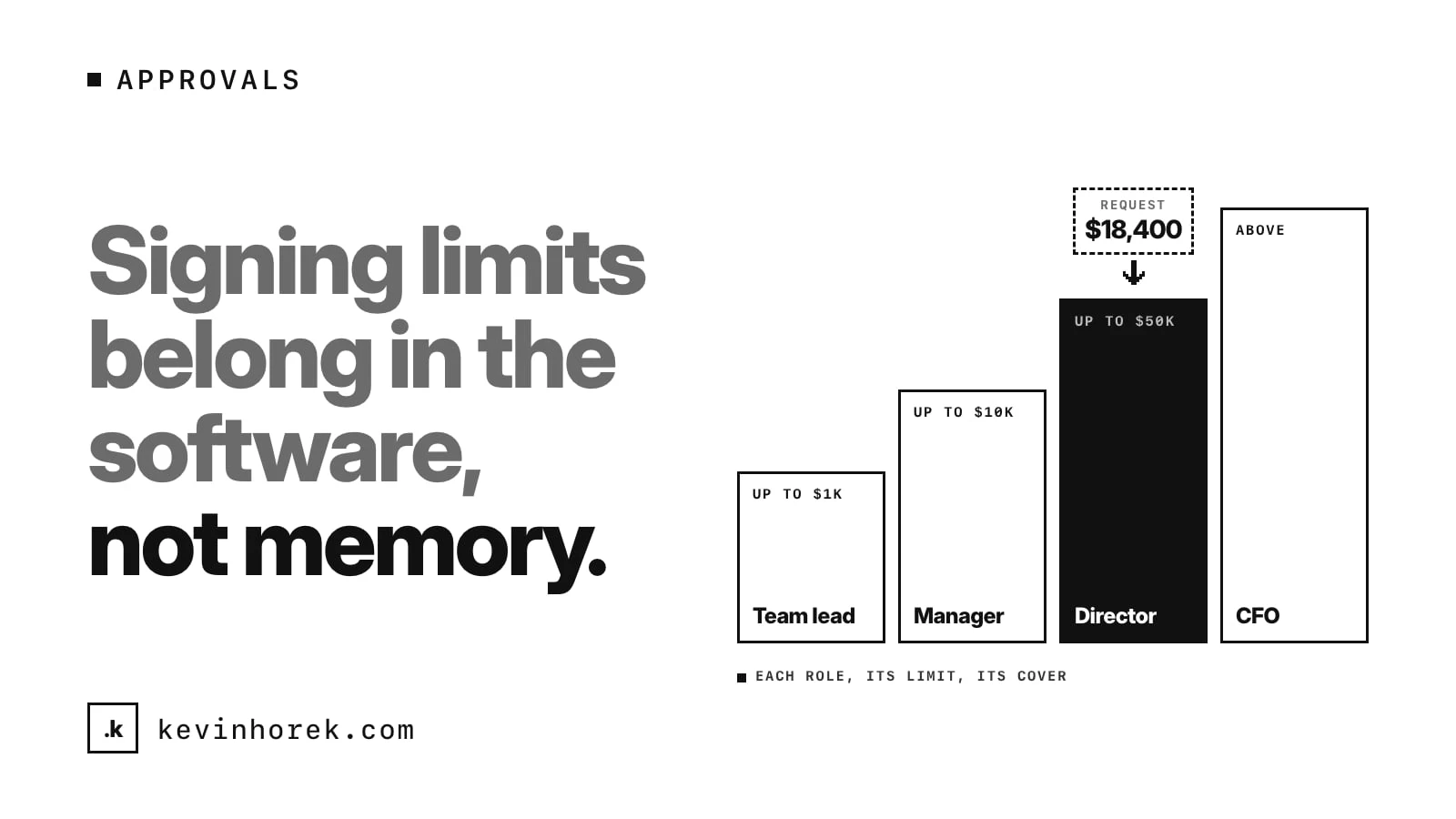
Most businesses have signing limits. A supervisor can approve small purchases. A manager can approve more. Anything bigger goes to a director, and the largest items go higher again.
In a lot of companies, those limits are not in any system. They are in a policy document nobody opens, or in the head of the person who has been there longest. Everyone else learns them by asking, or by getting it wrong.
That causes two problems, and they pull in opposite directions. Some orders stall, because nobody is sure who can say yes. Others slip through, because someone approved more than they were allowed to and nobody noticed until the invoice arrived.
My advice is simple. If a rule decides whether work can move forward, put it in the software, at the moment the decision gets made.
Write the rules down first
Before you design a single screen, get the rules on one page. For each role, write down:
- the largest amount it can approve on its own;
- what kinds of spending it can approve, if that differs by category;
- who it sends anything bigger to;
- who covers when that person is away.
This sounds obvious. It is also where most teams find out they do not agree. One manager thinks the limit applies per item. Another thinks it applies to the whole order. Someone else splits large orders into small ones to stay under the line, and has done it for years.
Settle those questions in a meeting, not in the code. The software should enforce a rule people already agreed on. It should not be the place where the rule gets invented.
Show who has to approve before anyone submits
The worst time to learn that a request needs a director's sign-off is three days after you sent it to your manager.
So show the approval path while the request is being written. As someone adds items and the total changes, the form should say who will need to approve it. If the total crosses a limit, the person writing it sees that straight away and can plan for it. They might split the order for a real reason, add a note for the director, or flag the deadline.
This one change removes a lot of the back and forth. Nobody has to guess, and nobody has to ask the person who has been there longest.
Let people approve within their limit, and route the rest
When a request reaches an approver, the screen should make the next step plain:
- Within their limit: approve or decline, with a short reason for a decline.
- Above their limit: send it on to the next level, with their own recommendation attached.
The approver should never see an approve button for something they are not allowed to approve. Hiding it is better than showing an error after they click. And when a request moves up, the next person should see what the first approver thought, so they are not starting from scratch.
It is the same idea I wrote about in where an AI agent should ask for human approval. Whether the request comes from a person or a piece of software, the rule about who can say yes should be explicit, and the person saying yes should see exactly what they are approving.
Plan for the boring cases
Approval rules break down in ordinary ways, not dramatic ones. Plan for these before launch:
- Someone is away. Every approver needs a named cover, or requests sit until they come back.
- A request sits too long. Decide how long is too long, then remind the approver and tell the requester where it is.
- The amount changes after approval. Decide whether a small increase needs a new approval. Most teams say yes above some amount.
- Someone leaves or changes role. Their limit should change the day their role does, not when someone remembers.
None of this is hard to build. It is just easy to forget, and each gap is where orders get stuck or slip through.
Record every decision
For each request, keep who asked, what they asked for, who approved or declined it, when, and why. If it moved up a level, keep that step too.
That record does more than satisfy an auditor. It lets a requester see where their order is without sending an email. It shows a lead which approvals take the longest. And over time it shows whether the limits are set in the right place. If directors approve almost everything that reaches them without changes, the manager limit may be too low. If managers keep declining the same kind of request, the rule may need to be clearer.
This is the same reason I ask for a short reason when work moves or stalls in work queues teams actually clear. The reasons are the most useful research you will get about how the process really works.
Show what is waiting
Approvals belong on the screen people open every morning, not only in an email notification that gets buried.
A count of requests waiting on you, and how old the oldest one is, does more than any reminder. For a manager, it means approvals get handled with the rest of the day's work. For the requester, it means they can see their order is in someone's queue, not lost.
Keep the rules editable
Limits change. A business grows, prices go up, a new role gets added. If changing a limit means asking a developer, the software will drift away from the policy, and people will start working around it again.
Give an admin a simple screen to see and change the limits by role, and record each change with who made it and when. Then the software and the policy stay the same thing.
If a rule decides whether work moves forward, it belongs where the work happens, not in someone's memory.
Try it
I built a rough prototype of this idea, QuoteYard, an app for an equipment rental branch. Its requisitions screen has signing limits by role. The new-requisition form shows the total and who has to approve it as you add items, and a manager can approve or decline within their limit or send larger requests up to the director. Try the demo. It runs on demo data, and nothing is sent anywhere.
A checklist for approval rules
- Write the limits for each role on one page, and agree on them as a team.
- Show who has to approve while the request is being written.
- Only offer approve to people allowed to approve that amount.
- Send larger requests up with the first approver's view attached.
- Name a cover for every approver, and remind people when requests sit.
- Record every decision, with who, when and why.
- Let an admin change limits without a developer, and record each change.
How does your team handle signing limits today? Are they in the software, in a policy document, or in someone's head?
If you want to share how your approvals work, email me.
#Workflow #Approvals #Operations #UX